Purple and Magenta Watercolor Florals: A Practical Guide to Usage and Selection
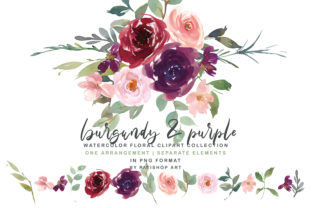
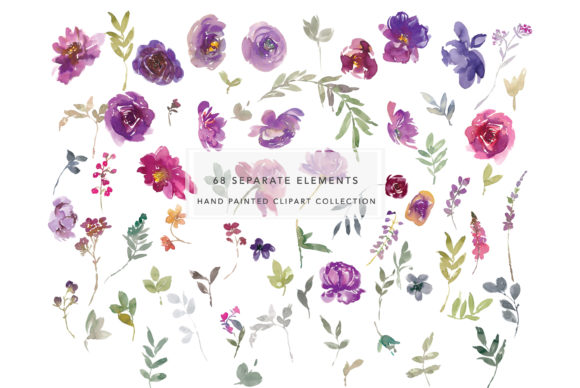
Vibrant botanical assets are a staple in digital design, but finding a collection that balances artistic fluidity with technical precision can be surprisingly difficult. Purple and Magenta Watercolor Florals offer a specific aesthetic niche that bridges the gap between romantic softness and bold, modern contrast. This particular clipart collection is designed for creators who need versatility without sacrificing quality. It includes ten distinct bouquets, sixty-eight separate elements, two ornate frames, one border, and a seamless pattern. However, owning these assets is only the first step. The true value lies in understanding how to leverage high-resolution PNG files effectively while avoiding common pitfalls that degrade the final presentation.
Many designers, from freelance marketers to hobbyist crafters, assume that all watercolor clipart functions identically. This assumption often leads to frustration when colors appear muddy in print or edges look jagged on screen. By examining the specific contents of this purple and magenta set, we can identify better workflows that ensure your projects maintain professional integrity.
Understanding Resolution and Print Clarity
The most frequent error when working with digital florals is ignoring the relationship between pixel dimensions and physical output size. This collection provides files at 300 DPI, which is the industry standard for crisp printing. However, resolution is meaningless if you stretch a small element beyond its intended capacity. The ten bouquet arrangements are sized approximately 14 x 8 inches, making them ideal for wedding invitations, poster headers, or large web banners. Conversely, the sixty-eight individual elements are roughly 2 x 2 or 2 x 1 inches.
A common mistake occurs when users attempt to use a 2-inch individual petal or leaf as a primary focal point on an 11x17 inch print. While software allows you to scale up, doing so introduces pixelation and blurriness that undermines the hand-painted watercolor effect. Instead, treat the smaller elements as accents, texture builders, or corner fillers. Use the larger bouquets for visual weight and anchor points. If you require a massive floral explosion, cluster multiple smaller elements organically rather than stretching a single file. This approach preserves the delicate brushwork and ink bleeding that defines the watercolor style.
Navigating Color Consistency Across Mediums
Purple and magenta are notoriously tricky colors in both digital and print environments. Magenta, in particular, exists outside the standard RGB gamut of many monitors, meaning what you see on screen may not match your printed proof. When utilizing this Purple and Magenta Watercolor Florals collection, it is vital to manage expectations regarding color reproduction.
Beginners often select these florals based solely on their vibrant screen appearance, only to be disappointed when the printed result looks dull or shifted toward blue. To avoid this, always perform a test print before committing to a large batch. If you are designing for digital platforms, ensure your workspace is calibrated correctly. For print projects, verify that your printer profile supports the specific magenta saturation in these files. Additionally, because these are pre-rendered PNGs, you cannot easily adjust the internal hue without degrading quality. Select this collection because the existing color palette aligns with your brand or project theme, not because you plan to color-correct it later. Accepting the natural color variation of watercolor media is part of achieving an authentic look.
Strategic Composition with Frames and Borders
The inclusion of two frames (approx. 14 x 16 and 12 x 14) and one border (17 x 6) suggests this collection is built for structured layouts. A prevalent design failure is treating these structural elements as mere afterthoughts or placing text directly over intricate floral details without considering readability.
Frames should serve as negative space containers, not just decorative outlines. When using the 14 x 16 frame, ensure your text block has sufficient padding from the painted edges. Watercolor textures are busy; placing dark text directly against deep purple petals creates accessibility issues and visual clutter. Instead, utilize the open center of the frame for typography. The 17 x 6 border is excellent for section dividers in long-form content or as a footer element in stationery. Avoid wrapping this border around four sides of a document unless the design specifically calls for a heavy enclosure. Over-framing can make a design feel claustrophobic. Use the border to guide the eye horizontally, creating flow rather than confinement.
Mastering Seamless Patterns Without Repetition Fatigue
The 12 x 12 seamless pattern is a powerful asset for backgrounds, packaging, and textiles. However, seamless does not mean invisible. A major oversight is applying the pattern at 100% opacity behind text or detailed imagery, resulting in a chaotic background that competes with foreground content.
To use the purple and magenta pattern effectively, consider reducing opacity to 10-20% when used as a text backdrop. Alternatively, use blending modes like "Multiply" or "Overlay" to integrate the pattern into a solid color base, allowing the white areas to become transparent or tinted. Another practical tip involves scale. A 12 x 12 tile may appear too dense when applied to a large surface area. Scaling the pattern down slightly can create a more refined, textile-like texture, while scaling it up emphasizes the individual brush strokes for a bolder statement. Always check the seam lines in your specific software; while the file is technically seamless, misalignment during application can create visible grid lines that ruin the illusion.
Evaluating File Integrity Before Purchase
Before integrating Purple and Magenta Watercolor Florals into your workflow, conduct a thorough evaluation of the file specifications. Verify that the PNGs include true transparency. Some marketplaces sell JPEGs disguised as clipart, which leaves you with unwanted white boxes around every flower. True transparency is non-negotiable for layering.
Additionally, inspect the edge quality in the preview images. High-quality watercolor clipart should have soft, anti-aliased edges where the paint fades into transparency. Hard, pixelated scissor marks indicate poor extraction and will look unprofessional when placed against colored backgrounds. Check the color depth as well; 8-bit PNGs may show banding in gradient washes, whereas higher bit depths preserve smooth transitions. Finally, review the licensing terms specifically for your use case. Commercial licenses vary significantly between personal crafting and selling digital templates. Ensuring compliance upfront prevents legal headaches and supports the artists who create these resources.
Optimizing Workflow Efficiency
Efficiency is just as important as aesthetics. Organize the sixty-eight separate elements by type or color before starting your project. Renaming files descriptively (e.g., "magenta-rose-left.png" instead of "element_04.png") saves hours of searching during complex compositions. Grouping related assets in your design software’s library panel allows for rapid iteration. Remember that watercolor is inherently imperfect; embrace slight overlaps and asymmetry. Rigid alignment often clashes with the organic nature of Purple and Magenta Watercolor Florals. By combining technical diligence with artistic intuition, you transform a simple clipart pack into a cohesive, professional design system that elevates your work above generic templates.