Watercolor Pomegranate: A Practical Guide to Using Hand-Drawn Digital Assets
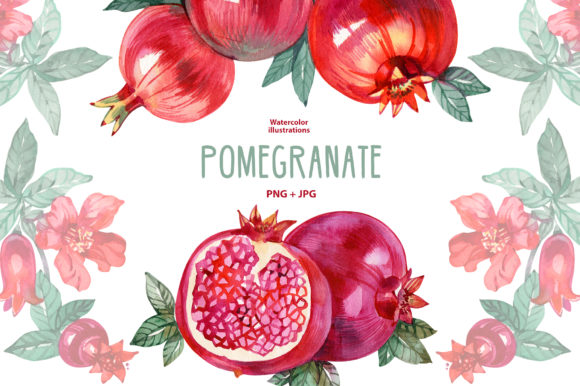
Dear customer, I created a special clipart set for you centered around the timeless elegance of the watercolor pomegranate. This botanical motif has seen a resurgence in digital design because it bridges the gap between rustic warmth and sophisticated celebration. Whether you are designing wedding stationery, autumn marketing materials, or educational resources, this specific aesthetic offers a versatility that vector art often lacks. However, owning high-quality assets is only half the battle. Many creators purchase beautiful hand-drawn elements only to struggle with implementation, file management, or print expectations. Understanding how to properly utilize these digital resources ensures your final project looks as professional on paper as it does on screen.
Understanding the Asset Composition
Before opening your design software, it is vital to understand exactly what this Watercolor Pomegranate collection entails to avoid workflow interruptions. This set includes six individual elements available in both PNG and JPG formats, one floral wreath in PNG and JPG, and four seamless digital papers. A common oversight among beginners is assuming all files serve the same purpose. The individual elements are designed for layering and composition, while the seamless papers are intended for backgrounds or packaging wraps. Confusing these two distinct asset types can lead to pixelation or awkward cropping. Always verify you are selecting the correct file type for your specific canvas size before beginning your layout.
Avoiding Resolution and Format Mistakes
The most frequent technical error when working with watercolor clipart involves misunderstanding resolution and transparency. While this set provides both PNG and JPG options, they are not interchangeable in every scenario. You should reserve the PNG files for any instance where you need a transparent background, such as placing a pomegranate element over a colored invitation card or a website header. Using a JPG in these instances will result in an unsightly white box around your artwork, forcing you to spend unnecessary time masking out the background manually.
Conversely, do not default to PNGs for full-page backgrounds or digital papers. PNG files retain more data and are significantly larger; using them for solid backgrounds can bloat your file size and slow down your design software without adding visual value. Use the JPG versions for backgrounds and the PNGs for overlays. Furthermore, always check the pixel dimensions before scaling. Watercolor textures rely on soft edges and paint bleeds. If you stretch a 300 DPI element beyond its native size, those delicate details turn into muddy artifacts. It is better to design within the asset’s limits than to force a small image to fill a large space.
Navigating Color Management and Printing
Digital screens emit light, while paper reflects it. This fundamental difference causes many disappointments when printing watercolor art at home or through a professional service. A vibrant crimson pomegranate on your monitor may appear dull or shifted toward brown on matte paper. To mitigate this, perform a test print on the exact paper stock you intend to use for the final run. Do not assume your home printer is calibrated correctly straight out of the box.
If you are visiting a local photo center or printing online, be aware that commercial printers often apply automatic color correction. This feature attempts to "fix" photos but frequently destroys intentional watercolor washes by increasing contrast and saturation artificially. Always select "no color correction" or "original colors" when uploading your files. For home printing, ensure your printer settings match your paper type. Selecting "plain paper" when using heavyweight cardstock prevents the printer from laying down enough ink, resulting in washed-out botanicals. Taking five minutes to adjust these settings saves wasted ink and paper.
Licensing and Commercial Application Clarity
For entrepreneurs, marketers, and small business owners, understanding usage rights is as important as aesthetic quality. When incorporating Watercolor Pomegranate elements into products for sale or client work, verify the license terms associated with your download. A common misconception is that purchasing a digital asset grants unlimited commercial rights. In reality, many licenses require the artwork to be part of a new, flattened design rather than resold as standalone clipart. Ensuring compliance protects your business from legal issues and respects the artist's intellectual property. If you plan to use these elements for merchandise like mugs or t-shirts, confirm that the license covers physical end-products specifically.
Managing Instant Downloads and File Organization
Since this is an instant download and no physical print will be shipped, immediate file management is crucial. Many users download zip files directly to their desktop and extract them haphazardly, leading to lost assets months later when they need to recreate a design. Create a dedicated folder structure for your digital assets immediately upon purchase. Separate the seamless papers from the individual elements and the wreaths. Rename files descriptively if the default names are generic codes. This small administrative task prevents future frustration and streamlines your creative process.
Additionally, back up your original high-resolution files to cloud storage or an external drive. Design projects often require revisions years after completion. Relying solely on a single computer hard drive risks losing access to the source material needed for future updates or reprints. Treat your digital asset library with the same organizational rigor as your physical supplies.
Evaluating Quality Before Commitment
When evaluating whether this Watercolor Pomegranate set fits your needs, look beyond the preview thumbnails. Zoom in to inspect the brushwork. Authentic hand-drawn watercolor should show natural variations in pigment density, slight imperfections, and organic edge bleeding. If the edges look too sharp or the gradients appear perfectly uniform, the asset may be digitally generated rather than traditionally painted. Traditional scans offer a depth and texture that elevates professional designs. Also, consider the cohesion of the set. Since this collection includes matching wreaths and seamless papers, verify that the color palette remains consistent across all items. Disjointed hues between the wreath and the individual fruits can make a cohesive branding project look amateurish.
Ensuring Satisfaction and Support
Digital products come with unique challenges, but support should never be one of them. If you are not happy with your order for any reason, please get in touch so I can address your concerns and work with you until you are totally satisfied. Whether the issue stems from a corrupted download, a misunderstanding of file formats, or simply a mismatch with your creative vision, communication is the solution. Many problems arise from simple technical oversights that can be resolved quickly with guidance. Do not hesitate to ask for clarification on usage, printing tips, or file compatibility. Your success with these watercolor pomegranate assets is the ultimate measure of this collection's value. I hope you enjoy creating with them as much as I enjoyed painting them.